
Task Bar Cube Steam Chests: Drop Rates & Daily Limits
Learn Task Bar Cube chest drop rates, the five-minute interval, DLC limit claims, and how daily caps differ from inventory space.

Task Bar Cube Gameplay Walkthrough LONGPLAY 4K 60FPS PC - No Commentary — Velirplay
General game footage used as fallback media. This is not a keyword-specific tutorial or device benchmark; use the cited references for factual claims.
Task Bar Cube steam chest drops: timing and rates
A long session still does not guarantee a Lv.5 chest. Task Bar Cube steam chest drops are advertised at one random chest per five minutes of play, with Lv.1 accounting for 85% of awards. Understanding Task Bar Cube steam chest drops helps you separate that interval from rare-chest odds, daily limits, and inventory space.
This guide covers the October 25, 2026 Steam Windows launch release described by the official Task Bar Cube Steam listing, with references reviewed October 26, 2026. No numbered patch was verified.
The advertised chest-level distribution is:
| Chest level | Advertised probability |
|---|---|
| Lv.1 | 85% |
| Lv.2 | 10% |
| Lv.3 | 3% |
| Lv.4 | 1.5% |
| Lv.5 | 0.5% |
These percentages total 100% and describe the level of the chest awarded. They do not describe the quality of an item obtained by opening it. Lv.1 dominates the advertised distribution, so receiving mostly low-level chests is consistent with the published rates.
Dividing an hour by five minutes gives 12 advertised intervals. That arithmetic helps explain the timing, but it is not a promise of 12 delivered chests during every hour. Daily limits remain a separate constraint, and the references do not establish every condition affecting delivery.
The wording also specifies play time. Offline Steam chest eligibility is unconfirmed. An advertised AFK earnings benefit should therefore not be treated as proof that Steam chests accumulate while the game is closed.
Chest level and item quality answer different questions
For Task Bar Cube steam chest drops, there are two distinct probability questions:
- Chest level: Which of the five chest levels will be awarded?
- Item quality: What quality of item will come from opening a particular chest?
The official Steam Community Market description for Chest Lv.5 identifies it as the fifth chest level and says it opens inside Task Bar Cube for a Steam item. It also describes a separate distribution of possible item qualities inside that chest.
Consequently, the 0.5% figure belongs to receiving a Lv.5 chest. It should not be presented as the chance of obtaining a particular item quality after opening one. Likewise, a percentage describing a Lv.5 chest’s contents cannot replace the 0.5% chest-level probability.
For a mathematical illustration, assume 1,000 chest awards follow the advertised probabilities. Multiplying 1,000 by 0.005 gives an expected five Lv.5 chests. That is a theoretical average, not a guaranteed result, a required drop schedule, or a prediction of how quickly an account can collect them.
Keep equipment progression separate, too. The game describes seven equipment rarities ranging from Common to Divine, plus seven tiers per item. Those equipment labels do not expand the five-level Steam chest table. A screenshot showing an equipment rarity is not evidence of a matching chest drop rate.
When comparing odds posted elsewhere, first identify what the percentage measures. A number without its chest level or opening context can easily answer the wrong question.
Daily chest limits, storage, and Market access
The Task Bar Cube steam chest limit concerns the daily allowance. Storage concerns where items are kept. Steam Community Market access concerns selling through Steam. Treating these as separate questions makes both purchase comparisons and troubleshooting more useful.
| Concept | What it describes | What it does not establish |
|---|---|---|
| Five-minute interval | Advertised timing for a random Steam chest | Unlimited daily awards |
| Daily Steam chest limit | The account’s daily chest allowance | Better odds for higher chest levels |
| Inventory pages | Available storage pages | The daily chest allowance |
| Battle-box limit | A separate advertised limit covering battle boxes, oysters, and starfish | The Steam chest probability distribution |
| Market access | Whether selling is available for the account | How often a chest drops |
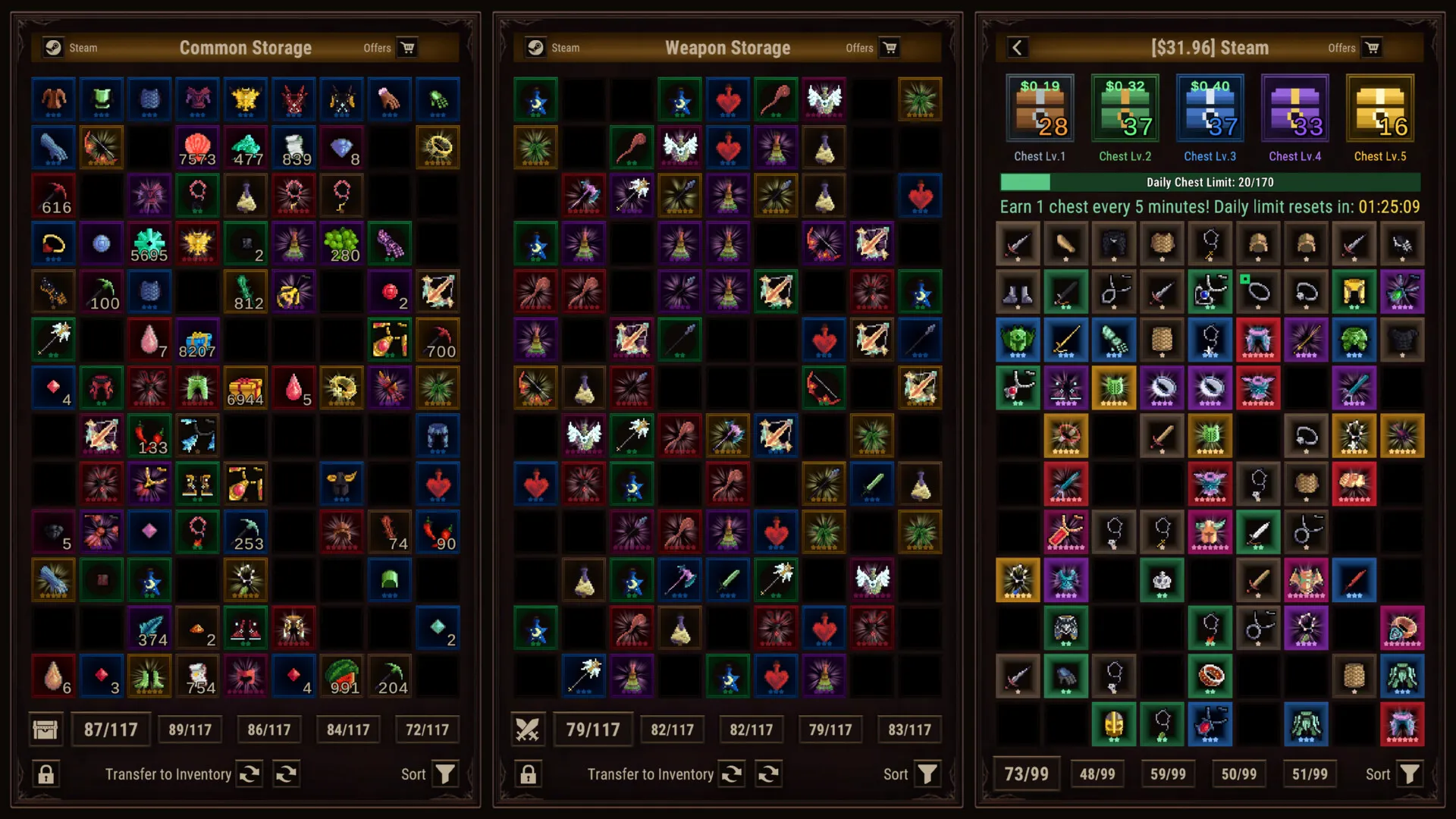
An official promotional screenshot shows Common Storage, Weapon Storage, and a separate Steam inventory/chest panel. This supports distinguishing equipment storage from the chest interface. Its displayed item counts and daily-limit values belong to a sample account; they do not establish the free account’s starting capacity or daily allowance.
The reviewed evidence does not confirm a universal free daily chest cap or the reset timezone. Avoid scheduling around an assumed midnight reset. When tracking your allowance, record the date and time alongside the displayed value so comparisons have a clear reference.
The chest’s Market description says chests and items can be sold. However, that statement does not establish an individual account’s current Market eligibility. If Steam displays a restriction, read that account-specific message separately from the game’s chest counter.
For Task Bar Cube steam chest drops, checking the game’s allowance and checking Steam’s selling status answer different problems. A selling restriction alone does not identify why a chest was not awarded.
What the three DLC listings advertise
Three DLC listings each advertise an increase of 50 to the daily Steam chest limit. Their other features differ, so compare the product’s full purpose rather than treating every package as an identical chest upgrade.
| Official product title | Other advertised features | Advertised daily Steam chest increase |
|---|---|---|
| Character Pack | 10 exclusive heroes, unlocked without a level requirement | +50 |
| Support Package | 10 exclusive pets, unlocked without a level requirement | +50 |
| Inventory Package | Expanded storage pages, including Steam Inventory pages 2–5 | +50 |
The names need attention. The Support Package description calls it the Companion Pack, while the Inventory Package description calls it the Storage Pack. Use the official product title when checking ownership or reporting a purchase issue so the package is identifiable.
All three listings also advertise:
- A separate increase of 50 to the limit for battle boxes, oysters, and starfish.
- An additional hour of AFK earnings duration.
- Automatic activation after a short delay, without restarting, while preserving progress.
These are distinct advertised benefits. The extra AFK hour does not confirm offline Steam chest awards, and the separate box-limit increase should not be added to the Steam chest allowance.
For Task Bar Cube steam chest drops, the shared advertised benefit is a higher daily limit. None of these listed chest benefits establishes improved Lv.5 odds. More allowance and a higher probability are different changes.
The Inventory Package also advertises five pages in each listed storage: General, Weapons, Equipment, Jewelry, Gems, and Production. Those storage features should be evaluated separately from its daily chest bonus.
Finally, the individual +50 claims do not verify how several purchases combine on one account. The reviewed material does not establish a confirmed combined cap or stacking rule.
What to check when drops or limits look wrong
When Task Bar Cube steam chest drops appear to stop, begin with the exact observation. A missing chest, an unexpected daily-limit value, and an unavailable Market sale require different evidence.
This checklist helps document the issue without assuming a cause:
| Observation | Useful evidence to record | Question it helps answer |
|---|---|---|
| No new chest appears | Session timing and the displayed chest count | What changed during the observed play period? |
| Daily allowance looks unexpected | The displayed limit and owned package titles | Which advertised entitlement is being compared? |
| Purchase benefit appears missing | Exact product name and before-and-after values | Which specific benefit differs from the listing? |
| Storage looks limited | Storage name and available pages | Is the issue about inventory capacity? |
| Selling is unavailable | Steam’s exact account or item message | What restriction is Steam actually displaying? |
These are evidence-gathering steps, not verified fixes. The reviewed references do not establish that restarting, changing a setting, clearing inventory, or waiting until a particular hour resolves a chest issue.
One launch-period community report describes a player seeing a daily limit of 220 after buying three DLC packages and expecting 270 after a Battle Pass purchase. That is one account’s reported observation and expectation. It does not verify the starting free cap, the combined DLC calculation, or a universal Battle Pass benefit.
No developer resolution was present in the retrieved discussion. There is therefore no confirmed Battle Pass fix to recommend from that report. Subtracting package bonuses from the player’s displayed total would also be insufficient evidence for a universal base allowance.
For a useful bug report, include the exact package title, the displayed daily allowance, the observed chest count, and when each observation occurred. If storage is involved, name the storage section rather than reporting only that “inventory is full.”
Keep the report focused on what changed and what the relevant listing promises. That makes the discrepancy easier to assess without presenting a suspected reset time or community calculation as an established mechanic.
What should you read next?
Continue with the missing chest troubleshooting. Players reported missing Steam chest rewards despite visible counters and expected collection.
Continue with the inventory and storage guide. Identify which inventory is full before selling items or buying more space.
Continue with the DLC comparison. Compare Character Pack, Support Package, and Inventory Package by their listed benefits.
FAQ
How often are Task Bar Cube steam chest drops advertised?
What is the chance of receiving a Lv.5 chest?
Do the DLC packages improve chest rarity?
What is the free daily cap, and when does it reset?
Related Articles
items
Task Bar Cube Storage Guide: Inventory, Sales & Capacity
Find the right inventory limit, compare Gold and Steam Market sales, and see what Task Bar Cube's Inventory Package unlocks.
purchases
Is the Task Bar Cube Battle Pass Worth It? Benefits & Risks
Compare Task Bar Cube’s advertised 30-day pass perks, daily rewards, chest limits, and DLC benefits before deciding whether to buy.
purchases
Task Bar Cube DLC Compared: Character, Pets & Storage
Compare Task Bar Cube DLC packs, active-team gold bonuses, storage unlocks, and shared limits before choosing a purchase.
Was this helpful?
Thanks for the feedback!