
Task Bar Cube Village Guide: Resources, Merchant & Shelves
Task Bar Cube village guide covering Farm, Hunting, Mining, Merchant rounds, Library upgrades, Animal Shelter bonuses, and material uses.

Task Bar Cube Gameplay Walkthrough LONGPLAY 4K 60FPS PC - No Commentary — Velirplay
General game footage used as fallback media. This is not a keyword-specific tutorial or device benchmark; use the cited references for factual claims.
Understand what each village system advances
Your village becomes easier to manage when every material has a clear job. This Task Bar Cube village guide explains the six systems so you can identify what advances production, what improves shelves, and which bonuses reach heroes or pets. Keep this Task Bar Cube village guide beside the village panels when comparing material requirements, activity levels, and shelf success chances.
This article covers the October 25, 2026 Steam Windows launch release using the official Task Bar Cube Steam listing and promotional screenshots, reviewed October 26. The mechanics below reflect developer descriptions in those panels. No numbered patch or hands-on mechanics test was verified, and screenshot account values should not be treated as universal starting statistics.
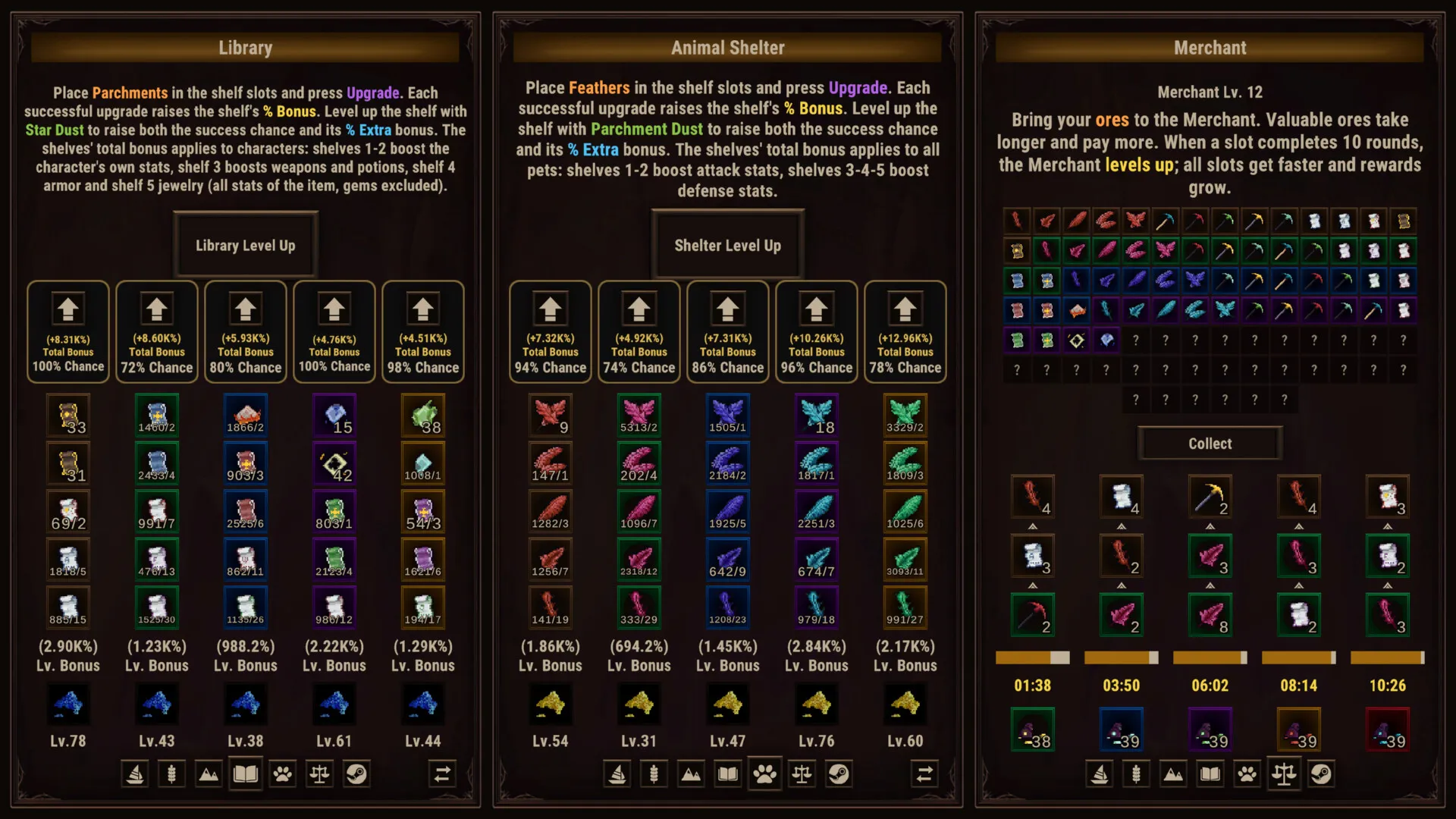
Farm, Hunting, and Mining develop their respective activities. The Merchant trades ores for rewards and grows through completed rounds. The Library and Animal Shelter improve shelf bonuses, with separate materials for upgrading shelves and leveling them.
Farm, Hunting, and Mining: production and activity XP
The production side of this Task Bar Cube village guide begins with the XP labels. Farm XP, Hunting XP, and Mining XP advance their named activities; each panel describes its own benefits and supporting upgrades.
| Activity | What earns activity XP | What higher activity levels improve | Additional material or requirement |
|---|---|---|---|
| Farm | Planting and harvesting gardens | Production speed and rewards | Fertilizer improves produce level and amount |
| Hunting | Catching fish or boxes | Available fishermen, fish types, and catch speed | Hunting Dust upgrades fisherman slots for rarity and stock |
| Mining | Mining ores | Access to more mines and pickaxe slots | Matching pickaxes are required; Ore Dust improves slot speed and stock |
Farm: distinguish activity growth from fertilizer
Planting and harvesting gardens produces crops and earns Farm XP. As Farm Level increases, the developer describes faster production and greater rewards. That gives you two useful checks when inspecting the Farm: your activity level and the production information currently displayed.
Fertilizer has a separate advertised effect: improving the level and quantity of produce. The supplied evidence does not establish its consumption rules or a best application schedule. Check the current fertilizer description before using it, and use your own garden values when judging the result. The promotional account cannot establish a universal harvest interval.
Hunting: check both Hunting Level and fisherman slots
Every caught fish or box contributes Hunting XP. Higher Hunting Level expands the activity through additional fishermen and fish types while also making catches faster.
Fisherman-slot upgrades use Hunting Dust and improve rarity and stock. These upgrades serve a different purpose from the activity level’s unlocks and speed improvements. When reviewing Hunting, identify whether you are looking at an activity-level benefit or a slot improvement before deciding what to pursue.
The panel specifically names Hunting XP. It does not verify a procedure for feeding fish to heroes, a fish requirement for character levels, or a fix for stalled hero progression.
Mining: match pickaxes to the mine
Mining awards Mining XP for each ore obtained. Higher Mining Level unlocks more mines and pickaxe slots, while Ore Dust upgrades slots for mining speed and stock.
Each mine requires its matching pickaxe, and pickaxes are consumed in sequence. When inspecting a mine, check that the pickaxe matches and review the available supply. These requirements deserve attention alongside Mining Level.
Mining also has a documented connection to another village service: it produces ores, and the Merchant accepts ores. The references do not establish a broader conversion chain from production outputs into every village upgrade currency.
Merchant: compare ore value, duration, and completed rounds
The Merchant accepts ores and returns rewards. More valuable ores require longer trades and offer larger payouts. For this Task Bar Cube village guide, the useful decision is to compare both displayed values whenever you inspect a trade.
| Merchant detail | Developer-described behavior | What to check in your panel |
|---|---|---|
| Ore value | More valuable ores pay more and take longer | The selected ore’s reward and duration |
| Completed rounds | A slot finishing ten rounds raises Merchant Level | That slot’s completed-round progress |
| Merchant Level | Higher level improves speed and rewards across all slots | Current level and updated slot values |
A bigger payout does not, by itself, establish the best reward rate. Because trade duration also changes with ore value, inspect the reward and time together. The promotional screenshot supplies no universal payout table or proven ore-selection strategy.
The level-up trigger is especially useful to remember: the developer describes ten completed rounds in a slot as raising Merchant Level. The resulting speed and reward improvements apply across all Merchant slots.
When reviewing progress, check the individual slot’s rounds alongside Merchant Level. These show the local completion milestone and the broader improvement it produces. Exact trade times, reward amounts, and closed-client completion behavior remain unverified.
Library and Animal Shelter: match materials to shelf actions
Shelf progression has two separate actions: upgrading a shelf and leveling it. This Task Bar Cube village guide keeps those actions distinct because their materials and described effects differ.
The Library improves character and item statistics. The Animal Shelter provides bonuses to all pets. Both systems describe successful shelf upgrades increasing a bonus, with shelf leveling improving success chance and an additional bonus.
| Building | Action | Material used | Described effect |
|---|---|---|---|
| Library | Upgrade a shelf | Parchments | A successful upgrade increases the shelf bonus |
| Library | Level a shelf | Star Dust | Improves success chance and the extra bonus |
| Animal Shelter | Upgrade a shelf | Feathers | A successful upgrade increases the shelf bonus |
| Animal Shelter | Level a shelf | Parchment Dust | Improves success chance and the extra bonus |
Parchments and Parchment Dust have different documented roles. Parchments support Library upgrade attempts; Parchment Dust supports Animal Shelter shelf leveling. Similarly, Star Dust belongs to Library shelf leveling, while Feathers belong to Animal Shelter upgrades.
Before spending, read the building name, action, and material together. A familiar currency name alone does not tell you which shelf action it supports.
Which shelves affect which statistics?
The shelf number determines the bonus target. Use the following comparison to identify the relevant shelf before considering its displayed cost or chance.
| Building | Shelf numbers | Bonus target |
|---|---|---|
| Library | 1 and 2 | A character’s own statistics |
| Library | 3 | Weapon and potion statistics |
| Library | 4 | Armor statistics |
| Library | 5 | Jewelry statistics |
| Animal Shelter | 1 and 2 | Pet attack statistics |
| Animal Shelter | 3 and 4 | Pet defense statistics |
The Library’s item bonuses exclude gem statistics. For example, when evaluating shelf 4, its documented target is armor statistics; the reference does not support applying that bonus to socketed gem statistics.
Animal Shelter bonuses apply to all pets. Its documented layout contains four shelves, divided between attack and defense effects. The supplied evidence provides no fifth shelter shelf.
Read bonus values and success chance separately
An important limit in this Task Bar Cube village guide is that the panels do not supply a complete stacking formula. Total Bonus, the level bonus, and success chance are separately displayed values. Their labels should not be turned into an invented addition or multiplication rule.
Leveling is described as improving success chance and the extra bonus, but the evidence establishes no universally best sequence of leveling and upgrade attempts. Compare the actual values shown for the shelf you want to improve.
The material roles are documented more clearly than their acquisition routes. No complete recipe is verified for converting crops, fish, ores, or unused equipment into Star Dust, Parchments, Feathers, or Parchment Dust.
A practical village check-in routine
Use this Task Bar Cube village guide as a checklist for reading your current account. The sequence below organizes a visit through the six systems; spending decisions depend on the requirements, targets, and chances displayed in your panels.
-
Review Farm production. Inspect garden status and Farm Level. If considering fertilizer, read its current information and compare its described produce benefits with what you want from the garden.
-
Review Hunting progression. Check Hunting Level for activity development, then inspect fisherman slots separately. Confirm that an intended slot upgrade uses Hunting Dust and affects the rarity or stock you are reviewing.
-
Review Mining supplies. Match each mine with its required pickaxe and inspect the available pickaxes. Check Mining Level for unlock progress and Ore Dust requirements for slot improvements.
-
Review Merchant trades. Compare an ore’s displayed reward with its duration. Check completed rounds in each slot and Merchant Level so you can follow the documented ten-round milestone.
-
Review Library targets. Choose the shelf associated with the character or item statistics you want to improve. Confirm whether the action requires Parchments for an upgrade or Star Dust for leveling.
-
Review Animal Shelter targets. Identify attack shelves or defense shelves, then check the action’s material. Feathers support upgrades; Parchment Dust supports shelf leveling, with bonuses applying to all pets.
After an action, compare the field it is described as changing. A Hunting activity-level increase concerns that activity’s progression; a fisherman-slot upgrade concerns its rarity and stock. A Library upgrade concerns its shelf bonus.
This approach makes progress easier to interpret without relying on the promotional account’s percentages. It also keeps resource production, activity XP, Merchant milestones, and shelf improvements connected to their documented purposes.
What should you read next?
Continue with the pet progression guide. Pets fight alongside heroes and have their own skills and Animal Shelter improvements.
Continue with the character leveling evidence. First identify whether you mean character level, equipment tier, Cube upgrades, or an activity level.
Continue with the Gold farming guide. Review enemy Gold gain, combat performance, surplus equipment sales, and AFK collection as different parts of your Gold routine.
FAQ
Does this Task Bar Cube village guide confirm offline production?
Does catching fish level my hero?
Can Parchments and Parchment Dust be used interchangeably?
Which Library or Animal Shelter shelf should I improve first?
Related Articles
progression
Task Bar Cube Leveling: Fish Reports & Level 1 Checks
Stuck at level 1? Review fish-leveling reports, separate hero XP from Hunting XP, and check item descriptions before using resources.
progression
Task Bar Cube Pets: Skills, Shelter Upgrades & Pack Bonuses
Understand pet skills, Animal Shelter shelves, Feathers, Parchment Dust, and the optional pet pack using official Task Bar Cube launch evidence.
purchases
Task Bar Cube DLC Compared: Character, Pets & Storage
Compare Task Bar Cube DLC packs, active-team gold bonuses, storage unlocks, and shared limits before choosing a purchase.
Was this helpful?
Thanks for the feedback!