
Task Bar Cube DLC Compared: Character, Pets & Storage
Compare Task Bar Cube DLC packs, active-team gold bonuses, storage unlocks, and shared limits before choosing a purchase.

Task Bar Cube Gameplay Walkthrough LONGPLAY 4K 60FPS PC - No Commentary — Velirplay
General game footage used as fallback media. This is not a keyword-specific tutorial or device benchmark; use the cited references for factual claims.
Which pack fits your play style?
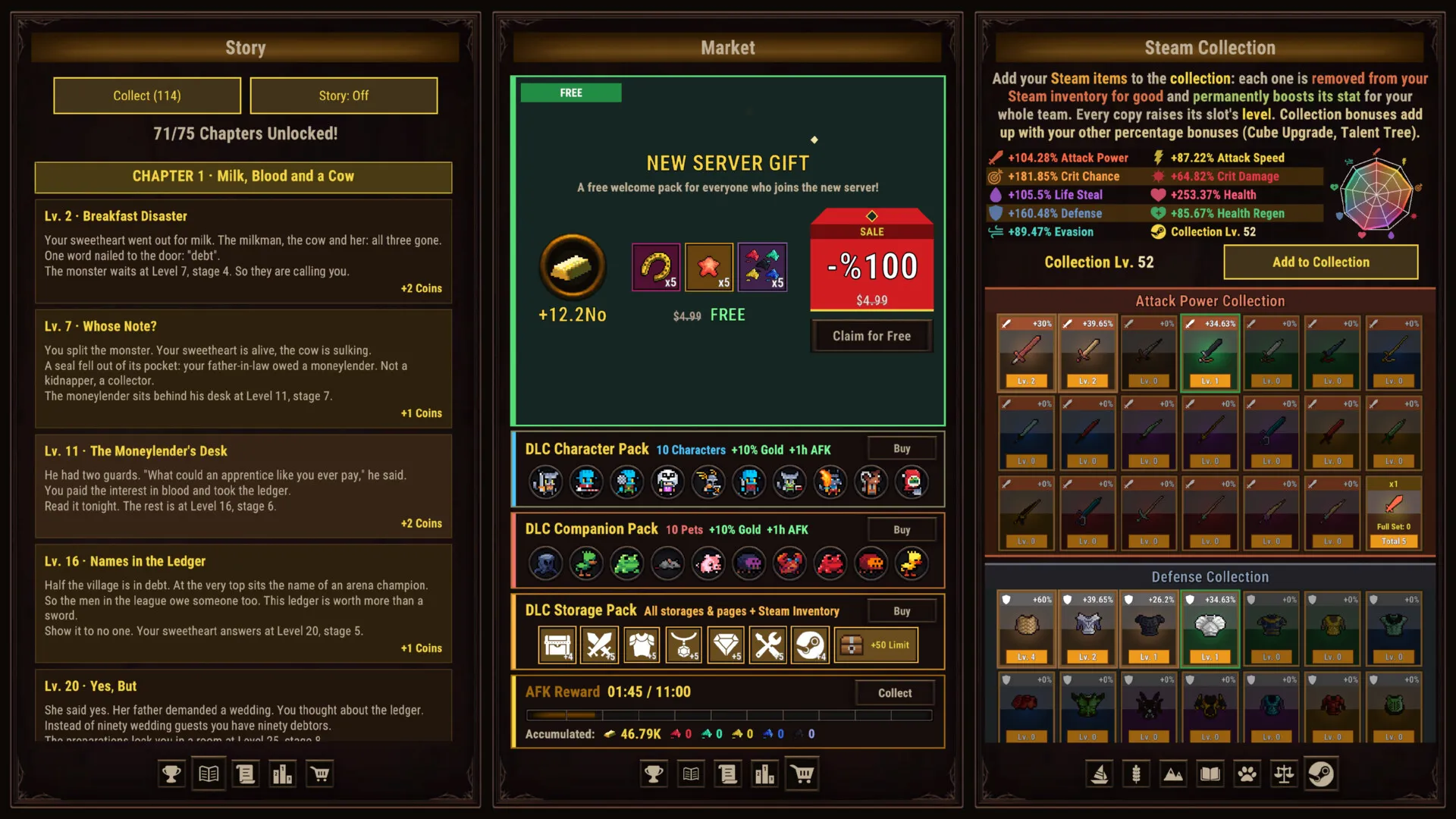
Task Bar Cube DLC splits your purchase decision three ways: heroes, pets, or storage. Choosing carefully matters because some gold bonuses depend on your active team, while extra capacity addresses a different need. This Task Bar Cube DLC comparison separates those benefits so you can choose around the problem you actually have.
The official Task Bar Cube Steam listing identifies DarkRook Interactive’s game as a free-to-play Windows desktop idle RPG released October 25, 2026. Heroes fight automatically, and the game can occupy a small taskbar window or run full screen.
This comparison covers the launch-release descriptions reviewed October 26, 2026; no numbered patch was verified. Recommendations below assess advertised features, without claiming hands-on gameplay or purchase testing.
Here is how the three Task Bar Cube DLC products divide their main benefits:
| Official product title | Main advertised unlock | Purchase focus |
|---|---|---|
| Character Pack | 10 exclusive heroes | Hero stats and gold bonuses |
| Support Package | 10 exclusive pets | Pet stats and gold bonuses |
| Inventory Package | Storage categories and additional pages | Item capacity |
The naming deserves attention before checkout. Support Package is the official product title, although its description uses Companion Pack. Likewise, Inventory Package is described as Storage Pack. These wording differences refer to the respective products, so use the official titles when matching a purchase to its listing.
Character Pack versus Support Package
Character Pack and Support Package follow similar designs: immediate roster unlocks, higher base stats, an active-unit gold benefit, and a separate permanent gold bonus. The important differences are the type of companion unlocked and the advertised gold percentages.
| Advertised feature | Character Pack | Support Package |
|---|---|---|
| Exclusive roster | 10 heroes | 10 pets |
| Unlock requirement | Available immediately, without a level requirement | Available immediately, without a level requirement |
| Base-stat advantage | 30% above regular heroes | 30% above regular pets |
| Gold per active pack unit | 5% per hero | 3% per pet |
| Active-unit gold bonus cap | 50% | 30% |
| Permanent gold benefit | +10% battle and AFK gold | +10% battle and AFK gold |
Ownership and active-team bonuses differ
The permanent gold benefit and the active-unit benefit have different conditions. The listings describe the permanent 10% battle and AFK gold bonus separately from the gold awarded for using pack heroes or pets.
For example, two eligible Character Pack heroes in the active team represent a 10% bonus under that pack’s active-hero rule. Two eligible Support Package pets represent 6% under the active-pet rule. Those examples concern only the conditional bonus; they do not calculate a combined gold multiplier.
Owning the full roster does not automatically establish that you receive the maximum active-team bonus. The descriptions tie that component to active pack units. Check which heroes or pets you intend to use before treating the advertised cap as your expected benefit.
Higher base stats need context
The 30% figure describes base stats. It does not establish 30% more damage, faster chapter completion, or an equivalent increase in overall progression.
Character Pack is the more relevant option if your purchase goal centers on heroes. Support Package fits a pet-focused purchase goal. Character Pack’s larger advertised active-unit gold cap is a useful comparison, but that number alone cannot establish which pack produces better results for your team.
What Inventory Package actually unlocks
Inventory Package is the Task Bar Cube DLC option centered on storage. Its description uses the name Storage Pack and identifies six storage categories: General, Weapons, Equipment, Jewelry, Gems, and Production.
The listing also distinguishes pages inside those storages from its Steam Inventory page unlocks.
| Storage feature | Advertised benefit |
|---|---|
| Storage categories | General, Weapons, Equipment, Jewelry, Gems, and Production |
| Pages within storage | Five pages in every storage |
| Steam Inventory pages | Unlocks pages 2–5 |
Keep those page descriptions separate when evaluating the purchase. “Five pages in every storage” describes the category storages; “pages 2–5” identifies the advertised Steam Inventory unlocks. Neither statement supplies a verified item-slot total.
The base game includes equipment fusion, gem socketing, and resource gathering through hunting, farming, and mining. Those systems make storage a relevant purchase consideration, but they do not prove that every player will encounter the same capacity problem.
Before buying, identify where space is actually limiting you. Are equipment categories becoming crowded? Are you looking specifically for the listed Steam Inventory pages? That distinction helps connect the purchase to a visible need.
The reviewed sources do not establish the starting free storage capacities. Consequently, it cannot support claims that Inventory Package doubles your space, provides a particular number of extra item slots, or eliminates every storage restriction.
Based on its advertised benefits, this is the pack to consider when capacity is your main concern. Its value is less clear if your existing storage already accommodates your normal play.
Shared Task Bar Cube DLC bonuses and chest limits
All three listings advertise the same set of additional limit increases. These shared benefits matter because a buyer interested only in longer AFK earnings or a larger chest allowance should compare the packs’ distinctive features before choosing.
| Shared advertised benefit | Increase listed for each pack | What to check |
|---|---|---|
| Daily Steam chest limit | +50 | Whether the daily allowance currently limits your play |
| Box limit covering battle boxes, oysters, and starfish | +50 | Which displayed limit affects the items you collect |
| AFK earnings duration | +1 hour | Whether your usual absences exceed your existing duration |
Extra capacity does not guarantee extra rewards
A higher daily chest limit raises the advertised allowance. It does not promise 50 chests immediately, guarantee that you will reach the increased limit, or establish better chest quality.
Similarly, an extra hour of AFK earnings duration concerns how long earnings can accumulate. It is a different benefit from the permanent gold percentage advertised by Character Pack and Support Package. The evidence does not establish the base AFK duration, so a complete post-purchase duration cannot be calculated here.
The base listing advertises a random Steam chest for every five minutes of play. Its stated chest-level probabilities are:
- Level 1: 85%
- Level 2: 10%
- Level 3: 3%
- Level 4: 1.5%
- Level 5: 0.5%
These percentages describe chest levels. They do not describe the quality of items inside a chest. The supplied DLC descriptions advertise a larger daily allowance without establishing improved chest-level probabilities or guaranteed financial returns.
Offline chest eligibility and the daily reset timezone also remain unverified. Avoid planning a purchase around a presumed offline chest schedule.
Combined limits remain unverified
Each product individually advertises these increases, but the reviewed sources do not establish the final calculation across multiple purchases. Do not assume that every repeated benefit stacks in a particular way or calculate a complete account allowance from the listings alone.
One launch-period community report describes a daily chest limit that did not match the player’s expectation after DLC and Battle Pass purchases. The retrieved discussion contained no developer resolution. That report flags an unresolved discrepancy; it does not establish universal account limits, Battle Pass contents, or a working fix.
Is Task Bar Cube DLC worth buying for your routine?
Based on the advertised benefits, the strongest reason to choose a pack is a specific feature you expect to use. No verified current-price comparison is available in the reviewed sources, so these recommendations concern feature fit.
- Consider Character Pack for a hero-focused purchase. Its distinctive benefits are exclusive heroes, higher hero base stats, and gold bonuses tied to active pack heroes.
- Consider Support Package for a pet-focused purchase. Its exclusive pets receive higher base stats, with a separate active-pet gold rule.
- Consider Inventory Package for storage pressure. Its main distinction is the named storage categories and page unlocks.
- Wait if your reason is still vague. Observe your active team, item space, and earnings limits until you can name the benefit you want.
A useful example is a player whose primary complaint is crowded equipment storage. The hero pack’s gold cap does not directly answer that complaint; Inventory Package’s advertised storage features deserve closer attention.
Conversely, someone shopping specifically for exclusive pets should examine Support Package’s roster and active-pet conditions. The shared chest and AFK increases do not make the three products interchangeable.
Before checkout, record your current daily chest limit, relevant box limits, AFK earnings duration, and available storage pages. This gives you a concrete comparison for the benefits advertised by your chosen pack.
Also separate roster ownership from roster use. If you expect an active-unit gold bonus, identify which purchased heroes or pets you plan to activate. A maximum printed in a description is less useful than understanding the condition that produces it.
Buying several packs solely to build a presumed combined multiplier introduces uncertainty that the supplied descriptions cannot resolve. Choose around an individually advertised benefit, and seek clarification on stacking if that calculation determines whether you would purchase.
What should you read next?
Continue with the Premium Pass comparison. Compare the pictured 30-day Premium Pass benefits with your actual play routine before paying.
Continue with the inventory and storage guide. Identify which inventory is full before selling items or buying more space.
Continue with the Battle Pass chest allowance report. Launch players reported that the advertised Battle Pass chest allowance did not match observed collection.
FAQ
Is Task Bar Cube DLC pay to win or purely cosmetic?
Do gold bonuses require pack heroes or pets to be active?
Do Task Bar Cube DLC bonuses stack across purchases?
How should a purchased pack activate?
Related Articles
chests
Task Bar Cube Steam Chests: Drop Rates & Daily Limits
Learn Task Bar Cube chest drop rates, the five-minute interval, DLC limit claims, and how daily caps differ from inventory space.
guide
Task Bar Cube Beginner Guide: Heroes, Gear & First Goals
Learn how heroes, pets, gear, village resources, Prestige, and optional packs fit together in Task Bar Cube, with practical first-session checks.
items
Task Bar Cube Steam Market Guide: Eligibility, Fees & Sales
Check Task Bar Cube item eligibility, Steam Market restrictions, selling steps, and fees before confirming your Steam Wallet proceeds.
Was this helpful?
Thanks for the feedback!